
Fleet Status
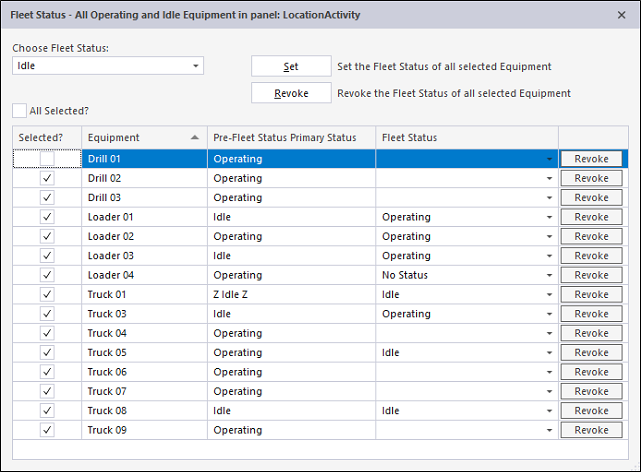
Use the Fleet Status window to change the primary status of all equipment (or a set of equipment) displayed in a Location Activity panel.
To set the Fleet Status for selected equipment:
- Open a Location Activity Panel.
- Click on the Fleet Status button in the top right-hand corner of the panel.

- In the Fleet Status window, select a Fleet Status from the drop-down list provided. The status list is a list of all operating or idle primary states.
- If you want to apply the Fleet Status to all equipment, select the All Selected check box. Alternatively, use the individual check boxes to select the equipment units you want to apply a fleet status change to.
- Click the Set button to set the fleet status for the selected equipment.
To revoke the Fleet Status for selected equipment:
- If you want to revoke the Fleet Status for all equipment, make sure the All Selected check box is selected and click the global Revoke button at the top of the window.
- Alternatively, use the individual Revoke buttons to select which equipment units you want to revoke.
If Data Acquisition or Mobile operators change the status of an equipment unit that is currently under a fleet status invocation, the fleet status is automatically revoked.
Want to learn more?
Online Help Manuals - Click here for the latest version
Learning Management System - Click here to login or here to request access
Comments
0 comments
Please sign in to leave a comment.